

Administration, Zero-Knowledge and Compliance
This guide is for the administrator who has to operate the vault across an organization, and the reviewer who has to sign off on it. By the end you will know how to make offboarding complete, who can export a vault, how multi-factor and device factors are enforced, what the audit trail captures, how the design limits the blast radius of a compromise, and the exact cryptography and compliance posture behind the zero-knowledge claim.
Make Offboarding Complete
After this section you will close the deprovisioning gap. The classic failure is that disabling someone's sign-in leaves the shared credentials they could see still usable, because a login block is not a credential revocation. Backbuild Secrets closes this at the vault. People get a vault by being added to it, one by one, so offboarding is a short, checkable list: remove the person from each shared vault they belong to, then from the organization.
Removing a person from a vault ends their access at once and rotates the vault key, so the copy they held no longer opens the vault, and it ends the machine access they had authorized. Suspending or deactivating their membership in the organization stops their sessions and the machine access they authorized from working, even before you remove them from each vault. The rotation and its two exceptions (a vault with items in its trash, and a vault holding file attachments) are covered in Sharing Vaults with Your Team. Pair this with your identity provider: single sign-on controls who can sign in to the workspace at all, and directory provisioning over SCIM is coming soon. See Security and Compliance and SSO and SCIM for how identity and provisioning are configured across the workspace.
Recovery is not an administrator power. No one in the organization, administrators included, can open, reset, or replace a member's secrets identity, so an administrator cannot read a departed member's personal vaults either. Keep a second owner on every shared vault, and the team never depends on one person's credentials. See Unlocking, Device Factor and Recovery.
Who Can Export a Vault
After this section you will know where a plaintext copy can come from. Export produces a plaintext file of a vault, so it is restricted to the vault's owners: the Export control is unavailable to managers and members, and the server refuses the export for anyone but an owner. Every attempt, allowed or refused, is written to the audit log with the person and the vault. The export runs on the person's own device and asks them to acknowledge that the file holds plaintext; the steps are in Vaults, Items and the Password Generator.
Enforce Multi-Factor and Device Factors
After this section you will know how strong authentication is required. Account authentication, including multi-factor requirements, is governed by your organization's security policy across the whole workspace, so the vault inherits the same sign-in assurance you set for everything else. On top of that, the vault applies its own step-up: sensitive actions, such as authorizing a machine, releasing a credential to an integration, or revealing a value from history, require a fresh confirmation even inside an unlocked, signed-in session. Device factors, which let a person reopen the vault with a verifying gesture, are enrolled per device after a master-password unlock and are individually revocable in security settings. See Signing In and Account Security for the account-level factors and Unlocking, Device Factor and Recovery for the vault's own device factor.
The Audit Trail
After this section a compliance owner will know exactly what is recorded. Every security-relevant action on the vault is written to a tamper-evident audit log: creating, editing, and deleting items; adding and removing people and changing a role; rotating a vault key; issuing and revoking grants and machine grants; every export attempt, allowed or refused; unlock attempts; every AI-tool call; and every release of a secret to a machine or an integration. Each record carries the acting identity, the time, and the target, and never the secret value. Tamper-evident is the precise word to carry into your own audit: a change cannot happen without its audit record. The wider audit surface, retention, and how to export the evidence an auditor samples are covered in Security and Compliance and the Security and Compliance API.
Blast Radius and Isolation
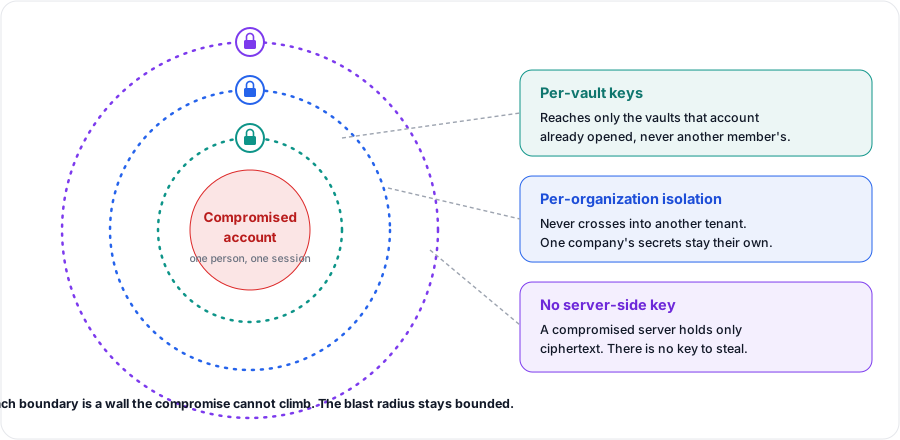
After this section you will be able to answer what one compromise reaches. The design keeps a single compromise from cascading. Secrets are encrypted per vault under keys wrapped to individual members, so a compromised account reaches only the vaults that account could already open, not the organization's secrets at large. Vaults are isolated per organization, so one tenant's secrets are never reachable from another. And because the vault is zero-knowledge, a compromise of the server itself yields ciphertext, not readable secrets: there is no server-side key to steal, because none exists. The scenario that has broken other managers in independent testing, a compromised server turning ciphertext into plaintext, has no path here.
The Cryptography, for Reviewers
After this section you will have the specifics a security reviewer asks for. The vault is zero-knowledge: plaintext and the keys that open it exist only on the user's own devices, and the server holds only ciphertext, wrapped keys, and public keys. The primitives are stated here as posture; the construction details are deliberately not, because they are not useful to you and would be useful to an attacker.
- Master password stretching: Argon2id, the memory-hard function that won the Password Hashing Competition, derives the master unlock key on the user's device.
- Key exchange (post-quantum): hybrid, combining X25519 with ML-KEM-768, the key-encapsulation mechanism standardized by NIST as FIPS 203. Hybrid means an attacker must break both the classical and the post-quantum part.
- Signatures (post-quantum): critical state is signed with a hybrid of Ed25519 and ML-DSA-65, the signature scheme standardized by NIST as FIPS 204, so a signature holds unless both the classical and the post-quantum part are broken.
- Item encryption: each vault has its own random key that encrypts item contents with XChaCha20-Poly1305 authenticated encryption, and that vault key is wrapped separately to each member's public key.
The post-quantum key exchange is what defends against harvest-now, decrypt-later: an adversary who records today's ciphertext, waiting for a future quantum computer, still cannot open it, because the key material was never protected by classical cryptography alone.
Compliance Posture
After this section you will have the row for your vendor risk register. Backbuild Secrets inherits the platform's compliance posture. The platform is built to meet the requirements of ISO 27001, SOC 2 Type II, HIPAA, and the OWASP Top 10, and billing runs through a PCI-compliant payment processor. This is a statement of the control bar the platform is engineered to; for current attestations and the supporting documentation a procurement or vendor-risk reviewer needs, see the Security and Compliance overview and the Backbuild Trust Center.
Two honest scoping notes for the vault specifically. A stored credit card is encrypted data a user keeps for their own reference and autofill, not a card Backbuild processes, so the vault is not a cardholder-data environment. And a passkey entry is a filed record for reference today, not a working authenticator that answers sign-in challenges.
With single sign-on alone, does access really go away when I
offboard someone?
A login block alone is not enough; the vault access has to be revoked too.
Suspend or deactivate the person in the organization, which stops their
sessions and the machine access they authorized, and remove them from each
shared vault, which ends their access and rotates the vault key where the
vault allows it.
How does revocation work, and does a removed user keep access to
what they already had?
Removal ends their access at once and, unless the vault's trash or file
attachments hold it back, rotates the vault key, so the copy they held no
longer opens the vault. It cannot un-see a value the person already
copied, so for a sensitive departure, also rotate the specific secrets they
had used.
Is the zero-knowledge claim real under a compromised server?
Yes. The plaintext and the unlocking key exist only on user devices; the
server holds ciphertext and public keys and no key that can decrypt them. A
server compromise yields ciphertext, which is the exact scenario that has
exposed weaker designs in independent testing.
What is your post-quantum stance?
The vault uses a hybrid post-quantum key exchange, X25519 with ML-KEM-768
(NIST FIPS 203), and signs critical state with ML-DSA-65 (FIPS 204), which
protects against harvest-now, decrypt-later.
Can an administrator recover, reset, or open a member's
vault?
No. There is no administrator recovery path: a member recovers only with
their own recovery kit, and no one in the organization, administrators
included, can open, reset, or replace a member's secrets identity. No one at
Backbuild can either. See Unlocking,
Device Factor and Recovery.
Can a member walk away with a plaintext copy of a shared
vault?
Not through export: only a vault's owners can export it, and every attempt
is audited. Anyone who can open a vault can still view and copy the values
they are allowed to use, which is why a sensitive departure ends with rotating
the credentials the person used.
Where is the third-party validation?
Current attestations and the security and legal documentation for vendor risk
review are in the Backbuild Trust
Center.
Next Steps
- Security and Compliance: the full workspace posture, identity, audit, and frameworks.
- Sharing Vaults with Your Team: roles, self-ceiling delegation, removal, and key rotation.
- Secrets for Machines, Integrations and AI Agents: the audited, scoped, revocable non-human grants.