

Secrets for Machines, Integrations and AI Agents
This guide teaches you to give a secret to something that is not a person, a
build machine, an on-demand container, a connected integration, a Virtual
Worker, or an AI agent, without scattering plaintext or handing over a value
that gets echoed into logs. By the end you will be able to get credentials
out of your .env files, scope a secret to exactly one machine or
task with an expiry, and understand why an AI agent can use a secret it can
never read.
One Vault for People and Machines
After this section you will see the shape of the problem this solves. The consensus fix for leaked credentials is well known: stop embedding long-lived secrets in code and configuration, and instead hand a short-lived, narrowly scoped secret to exactly the thing that needs it, at the moment it needs it. Backbuild Secrets does this from the same zero-knowledge vault that holds your human logins, with one property that holds across every case below: for a credential in a zero-knowledge vault, the platform never holds the plaintext, and the recipient uses the value without it being echoed back to your code, a model, or the logs.
Authorize a Machine or Container
After this section you will let a machine read a vault without a human unlocking each run. A machine grant authorizes one specific registered device or on-demand container to read the secrets in a designated vault, unattended. Enrollment is a deliberate consent, not a silent token handoff: the machine presents a code, and an owner of the vault, in an unlocked session and after a fresh second-factor confirmation, confirms it. The grant is bound to that machine's own key, to the specific vault, to the vault's current key, and to an expiry (thirty days for a command-line machine), so it is never a blanket, permanent credential.
The primary use is giving an on-demand container, or a coding-agent command-line tool you have linked, exactly the credential a run needs, released from the zero-knowledge vault rather than copied into the environment by hand. You can link a container or an agent only to a vault you are a member of, and letting it write captured credentials back into the vault needs the owner or manager role on that vault.
For the developer workflow end to end, replacing a .env file
with a launch-time injection, authorizing a workstation or a CI runner, and
managing grants across a team, see
Secrets from the CLI. It walks the machine
authorization ceremony, the secrets run command that projects
secrets into a process for its lifetime only, and the grant lifecycle.
How a machine grant ends
A machine grant fails closed: once any of these happens, the machine can no longer fetch the vault.
- It expires. The expiry is part of the signed grant, and nothing issued under it outlives it.
- The machine signs itself out.
backbuild secrets logoutremoves the machine's own authorization. - The person who authorized it loses that standing. Removing them from the vault or lowering them from owner ends the grants they authorized, and those grants stop working while their account in the organization is suspended or deactivated.
- The vault key is rotated. A grant is bound to the key it was issued for, so the key rotation that normally runs when an owner removes someone from the vault ends every machine grant on that vault. Re-authorize the machines that should keep access.
- An owner revokes it. Revoke a single machine over the REST API: list a vault's machine grants (owners and managers; each entry shows the machine's fingerprint, who authorized it, when, and the expiry) and revoke one by its fingerprint, which is the value
backbuild secrets statusprints on that machine. The Machines with access section on the vault's Sharing & permissions tab does not list machine grants yet, so use the API for this today.
Revoking stops the machine from reading the vault from then on; it cannot un-see a value the machine already read. For a lost or compromised machine, revoke it and rotate the credentials it could read.
Release Your Own Keys to a Connected Integration
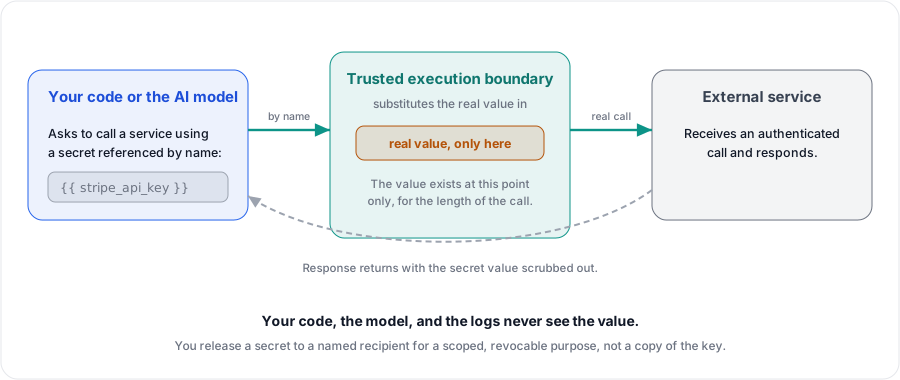
After this section you will let an integration act with your credential without exposing the value. When you connect an integration that must act with a credential, for example letting the AI assistant call a model provider with your own provider API keys (bring your own key), you knowingly release exactly the needed vault credential to that named service. The release is scoped to that recipient, needs your unlocked vault and a fresh second-factor confirmation, is audited, and stays in place until it is revoked, and only a service that is eligible for that kind of credential can receive one.
The boundary is the point. The platform uses the released credential at use-time on your behalf, substituting the real value in at the execution boundary, so your own application code and the model never touch the raw secret and it is never echoed back into a response or a log. You are releasing to a named recipient for a scoped, revocable purpose, not handing out a copy of the key.
Only the vault's owner can release one of its credentials to an integration. A release someone else authorized cannot be replaced by another person; the person who authorized it renews it in place, and a release that was revoked or has expired can be authorized again.
Give a Virtual Worker Its Own Vault
After this section you will understand how an autonomous worker uses secrets safely. A Virtual Worker is a non-human identity that runs tasks on its own. When you configure one, you bind a vault you own to hold its credentials, and you can grant it read access to other vaults you own. The vault stays yours: no one else, administrators included, gets access to its secrets unless you add them, and you can change or revoke the worker's access at any time.
A worker's access to secrets is task-scoped. A running task can reach only the secrets bound to that task's scope, checked at the moment of use. It reaches a person's vault only when that vault's owner has granted it access (only the vault's owner can grant it), and it can never reach another customer's secrets. Every autonomous use of a secret is audited.
A worker uses a granted secret without asking anyone: it runs a command with
the items it names injected (backbuild secrets run), and the
values are masked in that command's output. Printing a value is different:
it asks the vault owner who granted the access, who approves or denies it from
a prompt in their app with a fresh second factor, and a request nobody decides
is rejected after five minutes. Whatever a worker reports back, its own
sign-in credential for its AI tools is masked out of it.
The wider Virtual Worker model is covered in
Virtual Workers.
Why an AI Agent Can Use a Secret It Cannot Read
After this section you will be able to explain the AI boundary precisely. Backbuild is AI-native, and the vault is built so an assistant or worker can be genuinely useful with secrets without ever seeing one. The tools available to an AI agent let it check whether a vault is set up, ask the user to initialize one, record a request for a new password or entry, and list the names, descriptions, and allowed connection targets of entries together with the command that uses each one. None of them returns a value, its length, or its character set.
There is deliberately no tool that returns a plaintext value, because none
exists. When a secret is actually needed to run a command, it is injected into
that command by trusted code and masked in the command's output, so the model
and the logs see *** where the value would be. Masking is best
effort: it does not stop a value the command deliberately transforms or sends
elsewhere.
An agent can therefore create, organize, and use credentials on your behalf,
and still never be a place a secret can leak from.
Drive It Over the API and Native Tools
After this section you will know the programmable surfaces. The whole vault is drivable over the public REST API: status and initialization, unlock and lock, the master password, vaults and members, items, history and restore, attachments, the generator, trash, and the tree, plus device and grant management, including listing and revoking a vault's machine grants. Native tools for AI agents expose a safe subset over the Model Context Protocol: reading is available under a plain secrets scope, writing requires an explicit write scope, and no tool ever returns a secret value or even its shape.
- REST API Reference: the full endpoint surface for the vault.
- MCP Server: connect an AI agent to Backbuild's native tools.
- Secrets from the CLI: authorize a machine and inject secrets at launch.
How do I get secrets out of my .env files and
CI?
Store them in a vault, authorize the machine or CI runner once, and launch
your process with the secrets injected at runtime instead of read from a
file. There is one authoritative copy, nothing is written to disk, and each
machine's access is its own grant that you can end without touching the
others. See
Secrets from the CLI.
Can I scope a credential to one machine or task with an expiry,
and revoke it without affecting others?
Yes. A machine grant is bound to one machine's key, one vault, and an expiry,
and each machine has its own grant, so revoking one over the REST API never
disturbs the rest. Removing a person from the vault is different: it
normally rotates the vault key, which ends every machine grant on that vault. A Virtual
Worker's access is scoped to the running task and checked at use.
Can I rotate a secret without redeploying?
Yes. Update the value in the vault, and the next run of an authorized machine
or task picks up the new value at launch. There is nothing baked into an
image or a config file to rebuild.
Does the platform ever hold plaintext for a zero-knowledge vault
secret, even to deliver it to a machine?
No. The value is released from the zero-knowledge vault and substituted at the
execution boundary; it is not stored server-side in the clear and is not
echoed back into your code, a model's context, or the logs.
If I let the AI assistant use my model-provider key, does the key
get exposed?
No. The key is released to the named integration and used at the moment of
the call, substituted at the boundary and scrubbed from the response, so your
application code and the model never touch the raw value.
Next Steps
- Secrets from the CLI: the full machine-authorization and injection workflow.
- Virtual Workers: autonomous workers and how they use vault secrets.
- Administration, Zero-Knowledge and Compliance: the audit trail for every automated secret use.