

Support Workers
A support worker is a Virtual Worker pointed at your help desk. It reads a ticket's full conversation, drafts a reply, and posts that draft as an internal note for a human agent to review, so you get faster first responses and off-hours coverage while a person decides what reaches the customer. You assign workers to specific states of a ticket workflow, keep replying and resolving as separate settings, and let shifts cover the nights and weekends your human team does not. After this page you will be able to assign a worker to a workflow state, understand the draft-review flow, and cover the clock without a CSAT hit.
Support workers use the Support Agent permission role and run well on the in-app assistant over usage credits, so there is nothing to link to get started. See Hiring and Configuring a Worker.
Drafts as Internal Notes, Not Customer Replies
After this section you will understand the single most important thing a support worker does. When a support worker handles a ticket that reached a workflow state it is assigned to, the platform does not send its reply to the customer. The worker reads the ticket's public conversation and writes a reply, and the platform posts that reply as an internal note on the ticket, the same kind of note your human agents leave each other. A human then reads the draft, edits it if needed, and sends it, or discards it. Two other paths can post publicly: an automation rule that hands a ticket to a worker, and a worker that runs coding agents in a container acting through its own tools. Both are explained in Autonomy and Approvals, and the automation path again in the questions below. This is why a support worker raises your response speed without risking your CSAT: the worker does the reading and the writing, which is most of the work, and a person keeps the judgment call of what actually reaches the customer.
Assigning Workers to Workflow States
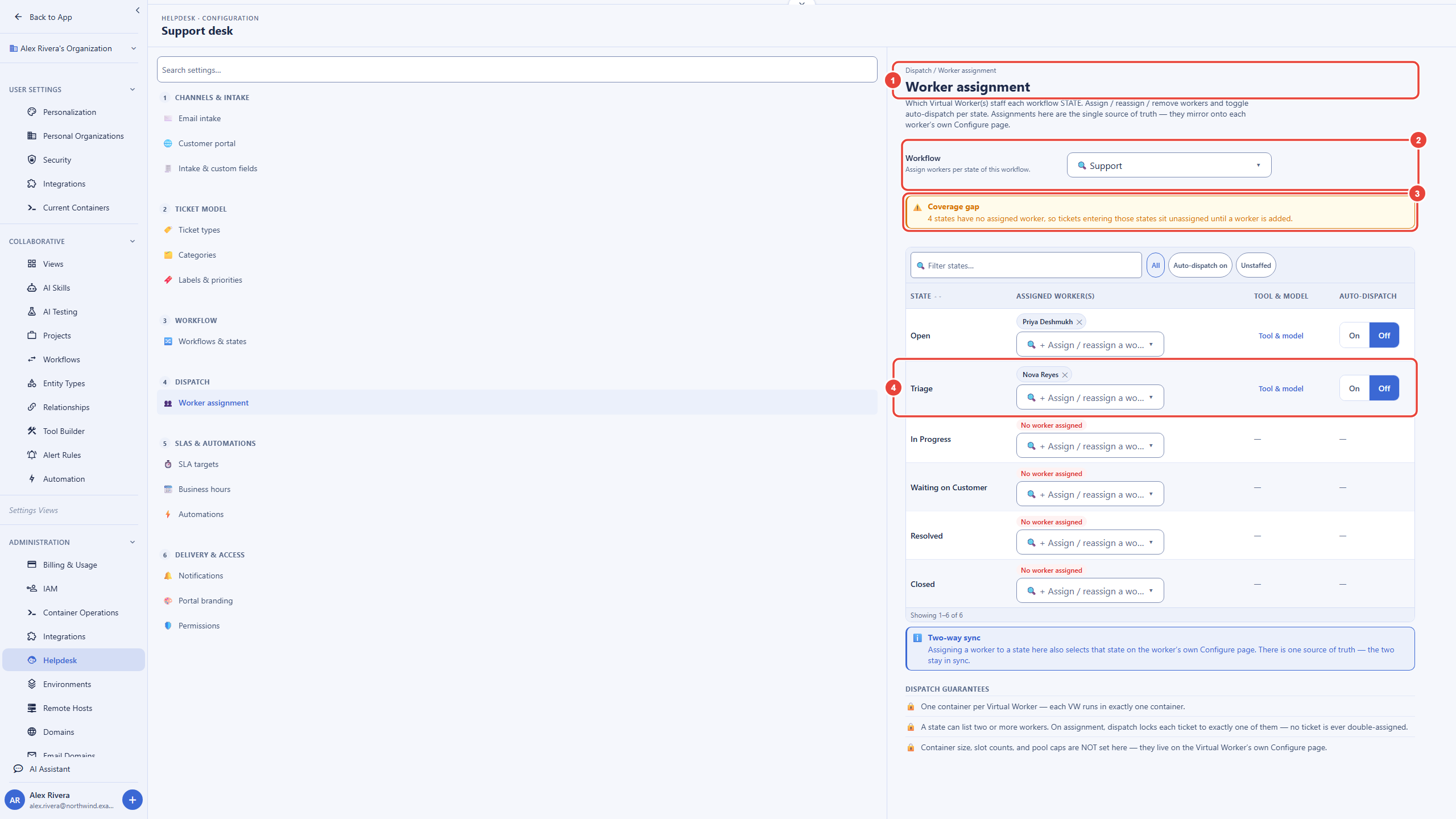
After this section you will be able to have tickets picked up automatically at the right point in your workflow. Open Settings, then Helpdesk under Administration. It opens on Worker assignment, in the Dispatch group. Pick a Workflow, and each state of that ticket workflow becomes a row:
- Assigned worker(s). Add a worker with the picker in the row, or remove one with the control on its name. A state can list two or more workers, and each ticket is locked to exactly one of them, so no ticket is ever worked twice.
- Auto-dispatch. On, tickets entering that state are picked up automatically by an assigned worker. Off, the worker does not pick them up on its own. Turning it on starts work that draws usage credits whenever a ticket enters the state, so it needs your organization's elevated help desk permission and a fresh two-step verification; turning it off needs neither.
- Coverage gap. A note lists the states with no worker, because tickets entering them sit unassigned until a worker is added.
The same assignments appear in each worker's Configure wizard, step 6, under Helpdesk stage assignments, and the two stay in sync. This maps a worker onto your existing triage process precisely, one state at a time, instead of turning it loose on the whole queue. Whether the worker may also move a ticket forward or close it is a separate autonomy setting, described below.
Reply Versus Resolve: Two Separate Settings
After this section you will be able to let a worker draft answers long before you let it close anything. Replying to a ticket and resolving or closing it are separate autonomy settings, so you can record that a worker may help with replies on a queue while resolving stays supervised. To be certain a person makes every close, mark the closing transitions of your workflow human-only: the platform never lets a worker take a human-only transition, whatever its settings say. This is the guard against the failure everyone in support has seen, where deflection numbers climb because tickets get closed, not because problems got solved. The settings, and what the platform enforces, are in Autonomy and Approvals.
Does the worker reply to customers directly, or draft for a human? On a workflow state it is assigned to, it drafts: its reply comes back as an internal note for a human to review and send, although a worker that runs coding agents in a container can still post through its own tools, as described above. An automation rule that hands a ticket to a worker is different: it posts the worker's reply publicly, so use that only for replies you are ready to send without review.
What counts as done or resolved by a worker? Be concrete: a worker can draft a reply, and it can move a ticket along a transition its workflow allows. Advancing or closing a ticket is its own setting, separate from replying, and a transition marked human-only always stays with a person, so nothing gets marked resolved just to inflate a deflection number.
How do I avoid a wrong answer closing a ticket? Mark the transitions that resolve or close a ticket human-only, and keep the resolve or close setting supervised while you let the worker draft replies. Read the transcripts before you relax either.
Grounding in Your Own Knowledge
After this section you will know where a worker's answers come from. A support worker works from the ticket's real conversation and from what its permission role lets it read, so its drafts answer the customer in front of it rather than a generic question. Your operating instructions tell it your tone, what it must never promise, and when to escalate to a human instead of answering. Because every draft is a reviewable internal note before anything is sent, you can correct an answer before a customer ever sees it.
Covering Nights, Weekends, and Holidays
After this section you will be able to cover the clock without paying overnight staff. A support worker's shift is how it gives you off-hours coverage on your terms. Put a worker on an evening or weekend shift and it picks up tickets after your human team logs off, drafting replies that are waiting for review when the team returns. Set a worker's holidays and it is off for those days. Off shift, a worker takes up no queued work and acts only when a person asks it something directly, such as in Chat; work that arrives waits in the queue and is taken up when the next shift begins, so nothing is dropped and nothing happens at an hour you did not intend.
Can a worker cover nights and weekends, and can I set its hours? Yes. A worker works the days and hours you set in its shift, read in its timezone, with holidays you choose. Off shift it takes up no queued work and acts only when a person asks it something directly, so you get overnight coverage without a worker acting at random hours.
Can I route specific ticket queues or states to a worker? Yes. Assign the worker to a workflow state under Worker assignment and turn on auto-dispatch, and tickets that reach that state are picked up there. Mark the transitions that close a ticket human-only to keep a person on every close.
Where to Next
- Autonomy and Approvals: the reply and resolve dials, the approval queue, and the send-email floor.
- Hiring and Configuring a Worker: give a support worker a mailbox, a manager, operating instructions, and a shift.
- Workflows and Automation: the ticket workflow states a worker is assigned to.
- Security and Governance: the transcript and audit trail behind every drafted reply.